Gmail Send mail as is ending in January 2027: what to do now
Yes, Gmail Send mail as is ending. In January 2027 Google removes it for every address that isn't hosted by Google, on the web and in the Gmail app. Mail forwarded into your Gmail will keep arriving. What stops is replying from your business address inside Gmail.
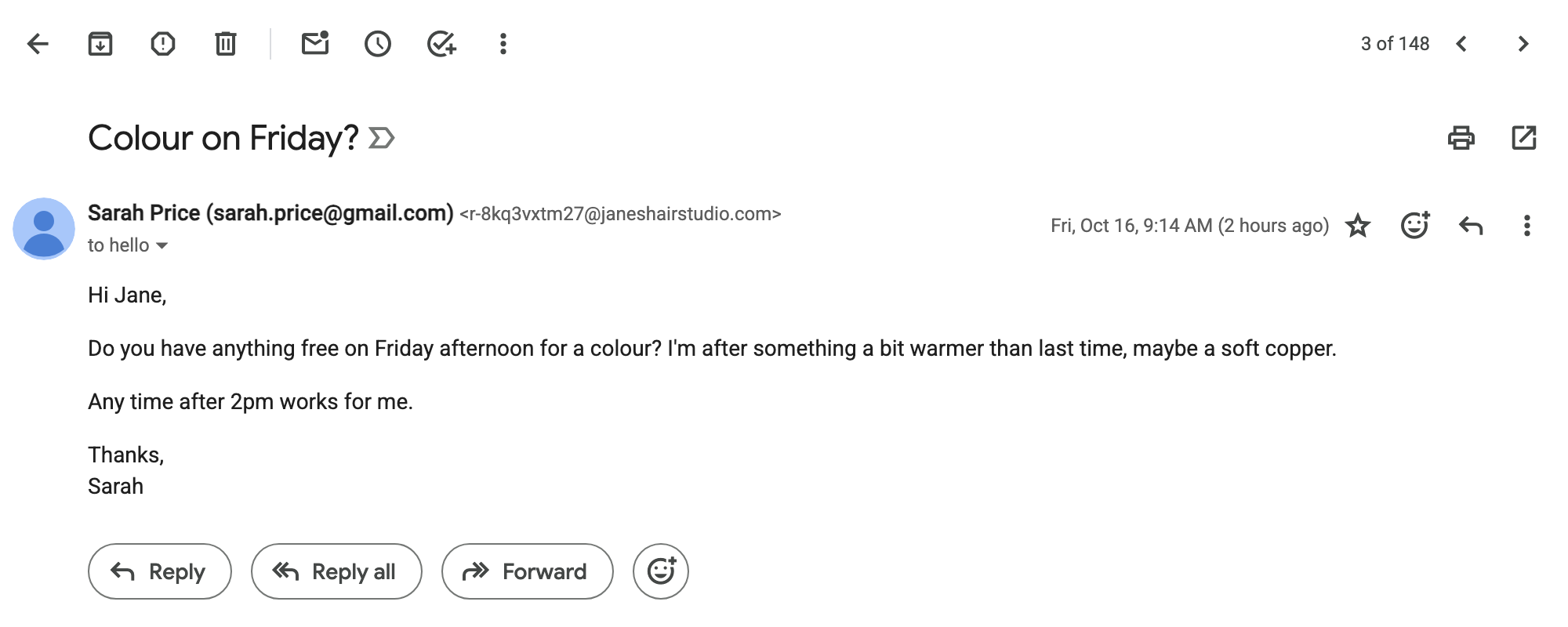
Picture a small salon. Today Jane's reply to a booking request comes from hello@janeshairstudio.com. After January, if she does nothing, the same reply reaches her client from jane.miller.salon@gmail.com, a sender they may not recognise.
This guide covers what's changing, how to check in two minutes whether you're affected and every realistic option, including the ones that aren't us.
What Gmail is changing in January 2027
Google explains the change on a help page called Learn about changes to third-party email account support in Gmail. "Third-party" means any address not hosted by Google, such as Yahoo, Outlook or a business domain whose mail lives somewhere else.
From January 2027, four things go away:
- Send mail as for third-party addresses. In Google's words: "You will no longer be able to send mail from third-party email accounts in Gmail on the web or in the Gmail mobile apps."
- Gmailify, which applied Gmail's spam filter and labels to an outside account, such as Yahoo or Outlook.
- Check mail from other accounts, which pulled mail into Gmail over POP. Gmail closed this to new users in early 2026, as The Register reported in January.
- Adding or syncing third-party accounts in Gmail on the web.
Google's Send mail as help page says the same thing in one line: "Starting January 2027, Gmail will no longer support the 'Send as' feature for third-party email addresses."
The timeline
Google gives three stages:
| When | What happens |
|---|---|
| Q3 2026 | Google announces the change and shows notices in Gmail |
| Q3–Q4 2026 | Transition. "Gmail may restrict new configurations" |
| January 2027 | Send mail as for third-party accounts, Gmailify and POP are fully removed |
The middle row matters more than it looks. Proton reported in August 2026 that Google has already started restricting new Send mail as setups on the web. If your setup works today, it should keep working until January. But if you delete it, or set up a new address, you may not be able to add it back.
What ends and what keeps working
Most of the worry around the Send mail as ending comes from not knowing what breaks. Here's the whole list, taken from Google's two help pages:
| Feature | After January 2027 |
|---|---|
| Send mail as from a non-Google address | Ends |
| Gmailify | Ends |
| Check mail from other accounts (POP) | Ends |
| Adding third-party accounts in Gmail on the web | Ends |
| Forwarding mail into your Gmail | Keeps working |
| Mail already in your Gmail | Stays where it is |
| Send mail as for another Gmail address or a Google Workspace alias | Keeps working |
| Other email accounts added to the Gmail mobile app | Keeps working |
The important line is forwarding. Google even suggests it: "You can configure your third-party provider to auto-forward messages to your Gmail address." So receiving business mail in Gmail isn't the problem. Replying as your business is.
Does the Send mail as change affect custom domains?
Google's examples are @yahoo.com and @hotmail.com. It doesn't say "custom domains" anywhere on the page, which has left many business owners hoping they're safe.
They probably aren't. Google says the change "only applies to third-party, non-Google email accounts." If your domain's email isn't hosted by Google Workspace, it's a non-Google account. Most small businesses that bought a domain at GoDaddy, Namecheap or Squarespace and forward it to Gmail are in exactly that position.
Google's own advice points the same way. For a "business or custom domain", its suggestion is to move to Google Workspace. It wouldn't need to suggest that if custom domains weren't affected.
The one group that's safe: businesses whose domain is already on Google Workspace. Their aliases keep working.
How to check whether you're affected
This takes about two minutes, on a computer:
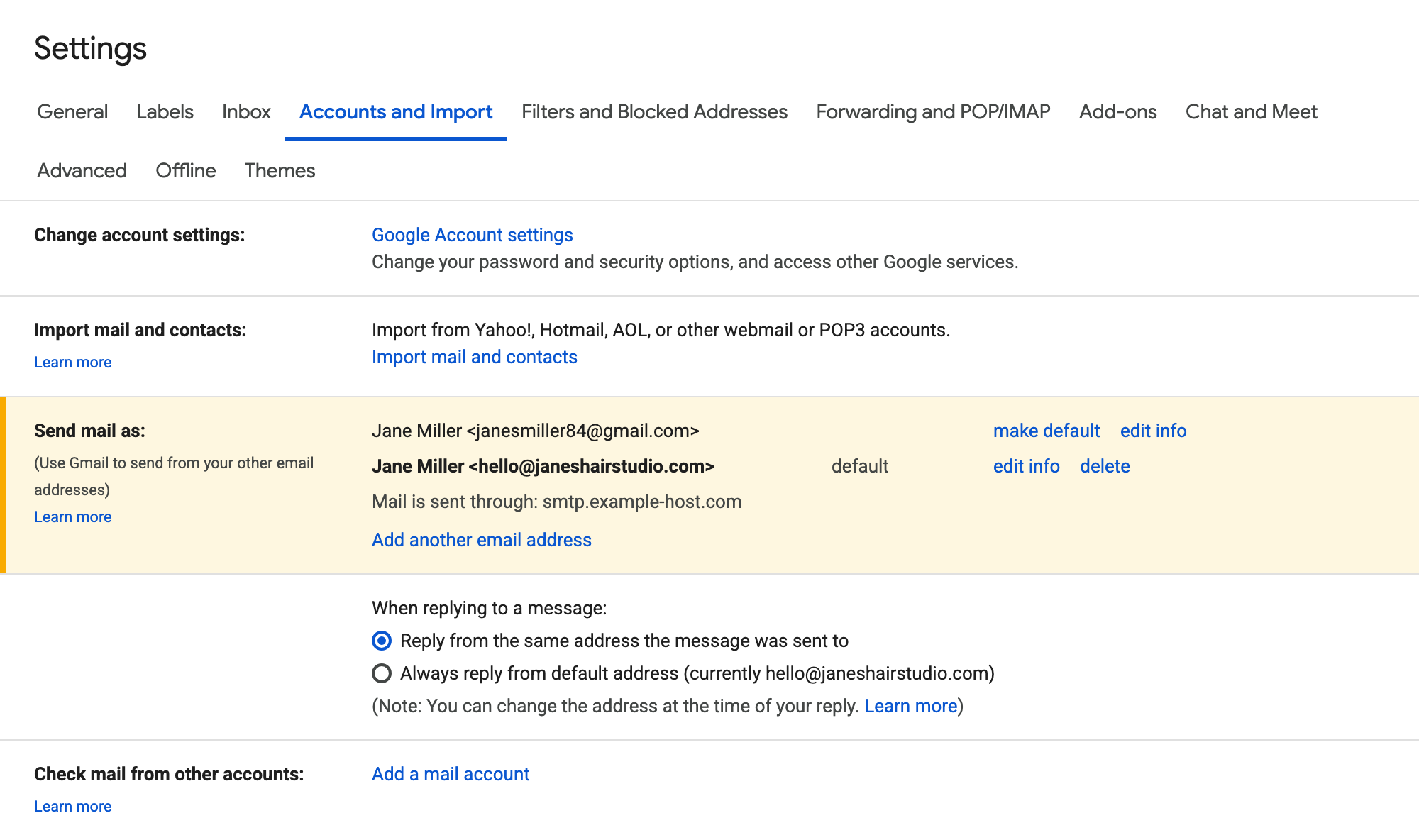
- Open Gmail and click the gear icon, then See all settings.
- Open the Accounts and Import tab.
- Look at the Send mail as section.
- Then look at Check mail from other accounts, just below it.
If you only see your own @gmail.com address under Send mail as, you're not affected. Nothing changes for you.
If you see your business address there, like hello@yourbusiness.com, you're affected. From January 2027 you won't be able to send from it in Gmail.
If your business address appears under Check mail from other accounts, your incoming mail is affected too. You'll need to switch to forwarding before January, or that mail will stop arriving in Gmail.
Prefer a quick answer? Our free Gmail 2027 check looks up who hosts your address and asks the same three questions.
What happens to your email on the day
Take Mark, a plumber in Dublin who quotes jobs by email from mark@davisplumbing.ie. His domain forwards to Gmail, and he set up Send mail as years ago. He answers most enquiries from the Gmail app while he's between jobs.
On the day the change reaches his account, new enquiries still arrive, because forwarding keeps working. But when he hits Reply, the business address isn't there to choose, so his quotes go out from his personal Gmail. Nothing is lost, yet the address on his van stops matching the one his customers hear back from.
That's the real cost of doing nothing: not lost mail, but replies that no longer look like your business.
Your options after Send mail as ends
There are five realistic paths. None of them is right for everyone, so for each one we've said who it suits.
Move to Google Workspace
This is Google's own recommendation. Workspace gives your domain a proper Google mailbox, so Send as for your aliases keeps working.
- Cost: Business Starter is €6.80 per user per month with a one-year commitment (Google Workspace pricing, checked October 2026). VAT is added where it applies.
- What changes: You work in a new Google account, not your current Gmail. You'll import your old mail or switch between two accounts.
- Best for: Teams who want Drive, shared calendars and a clean, separate business mailbox.
Per-user pricing adds up for small teams. Say Alice runs a three-person accounting practice, and all three reply to clients.
On Workspace that's three seats, about €20 a month on the annual plan, before VAT. That's fine if they'll use the rest of Workspace. It's a lot to pay just to keep replying from the business address.
Use a desktop mail app
Outlook, Apple Mail and Thunderbird can still send from any address you own. Your mail can keep forwarding to Gmail, and you reply from the desktop app instead.
- Cost: The apps are free. You'll need an outgoing mail service for your domain, which is often a paid plan with your forwarding provider.
- What changes: You read business mail in a different app, with its own settings. Phone support varies by app.
- Best for: People who work at a computer all day and are comfortable with mail settings.
Switch to another email provider
Zoho Mail, Fastmail, Migadu and Proton all host a mailbox on your own domain, usually for less than Workspace. You can add that mailbox to the Gmail app on your phone, which Google says keeps working.
- Cost: From free (Zoho's Mail Free plan, up to five users, in Zoho's own app only) to a few euros per user per month. Check each provider's current pricing.
- What changes: A new inbox, a new password and usually some DNS work. On a computer you read business mail outside Gmail.
- Best for: People happy to keep business and personal mail in separate places.
Keep forwarding and reply from @gmail.com
This is what happens if you do nothing. Mail still arrives; replies come from your personal address.
- Cost: Free.
- Best for: Hobby projects, or addresses nobody replies from.
Forward to Gmail and reply through Letterdoor
This is what we built Letterdoor for. Your mail is forwarded to the Gmail you already use. When you hit Reply, on your computer or in the Gmail app, we deliver your reply from your business address.
It doesn't use Send mail as, so the January change doesn't affect it. You can see how replying from Gmail works on our homepage.
- Cost: €9 a month per domain, or €90 a year, VAT added where it applies. Up to 10 addresses, and each person on your team replies from their own Gmail.
- What changes: Nothing in Gmail. We set up your domain with you on a 15-minute call.
- Best for: Small businesses who want to keep working exactly as they do now.
Here's how the options compare:
| Option | Stay in your Gmail? | Reply as business on your phone? | Cost for 3 people | Setup |
|---|---|---|---|---|
| Google Workspace | No, new account | Yes | ~€20/month (annual) | Self-serve |
| Desktop mail app | No, separate app | Depends on app | Free app + sending service | Self-serve |
| Another email provider | No, separate inbox | Yes, via Gmail app | Varies | Self-serve |
| Reply from @gmail.com | Yes | No | Free | None |
| Letterdoor | Yes | Yes | €9/month per domain | 15-minute call with us |
Want to keep everything as it is? Book a 15-minute setup call. Nothing to pay today.
Be careful with replacement tools
Google's help page includes a warning worth repeating. It asks you to be careful with third-party tools or extensions that promise to replace these features, because they often need your email password or access to your Google account.
Before you choose any service, check three things:
- Does it ask for your Gmail password or full access to your Google account? A service that only forwards and sends mail for your domain shouldn't need either.
- Where is your mail kept? Look for a clear privacy policy that says which country your data is in and how long it's stored.
- Can you leave easily? Your domain should stay yours, and switching should only mean changing a few DNS records.
For what it's worth, Letterdoor never asks for your Gmail password or Google sign-in. We don't keep a mailbox of your messages, and our data is kept in the EU.
What to do before January 2027
Here's the short version, in order:
- Check Settings > Accounts and Import in Gmail to see whether you use Send mail as or Check mail from other accounts.
- Don't delete a working Send mail as setup. You may not be able to add it back during the transition.
- Decide whether you want a new mailbox (Workspace or another provider) or want to stay in Gmail.
- Switch to forwarding if your mail currently comes in through Check mail from other accounts.
- Make the change before January, so no client gets a reply from your personal address.
- Tell anyone else who replies as the business, like a receptionist or partner.
Think back to Jane at the salon. If she spends 15 minutes on this in November, Sarah never notices anything. Her next booking confirmation still comes from hello@janeshairstudio.com, and Jane still answers it from her phone between appointments.
Gmail Send mail as is ending: the bottom line
Gmail Send mail as is ending in January 2027 for addresses outside Google, along with Gmailify and POP fetching. Forwarding into Gmail keeps working, so your mail is safe. The decision is how you want to reply: from a new mailbox, from another app, from your personal Gmail or from your business address in the Gmail you already use.
If you'd like to stay in Gmail, we'll set it up with you. Book a 15-minute setup call and you'll reply to your first email from your business address before we hang up. Not sure it fits? Call Josef, the founder, on +420 608 58 30 36.
Frequently asked questions
Is Gmail removing Send mail as for custom domains?
Very likely, yes. Google says the change applies to all "third-party, non-Google email accounts". A business address on your own domain counts, unless the domain is hosted on Google Workspace. Google's examples are Yahoo and Hotmail, but its advice for custom domains is to move to Workspace.
When exactly does Send mail as stop working?
Google says January 2027, without a specific day. New setups may already be restricted during Q3–Q4 2026. Existing setups should keep working until the removal reaches your account.
Will I lose my old emails when Send mail as ends?
No. Mail already in your Gmail stays there. Sent messages stay in your Sent folder too.
Does email forwarding to Gmail still work after January 2027?
Yes. Google lists forwarding as one of the things that keeps working, and even recommends it for receiving mail from other accounts.
Why is Send mail as not working in Gmail?
During the transition, Google says "Gmail may restrict new configurations". Proton reported in August 2026 that new Send mail as setups are already being blocked on the web. If you get an error such as "authentication failed" while adding an address, that may be why. Existing setups should keep working until January 2027.
Does this affect Google Workspace?
No. Google says the change doesn't affect Google Workspace aliases or other Gmail addresses you own.
Can I still reply from my business address in the Gmail app on my phone?
Not with Send mail as. You can add a separately hosted business mailbox to the Gmail app, or use a service like Letterdoor, where you just hit Reply and the reply goes out from your business address.